Built by a deck builder, for deck builders

Save hours every week and stop the mistakes eating your profit.

Draw the deck in the customer's yard, price it from your own numbers before you leave the driveway, and run every job from the first call to the final walkthrough. One system, set up around how your company works.

30 days freeNo card neededYour whole crew, one flat priceFree setup help
Sawdust Draw
A deck drawn in Sawdust with its price, $10,500, and how it's built

One place instead of a drawing app, a pricing spreadsheet, a whiteboard, sticky notes and a dozen texts a day.

Sound familiar?

Running a deck company shouldn't eat your nights.

Quotes at the kitchen table

You measure all day, then figure prices and material lists until midnight.

Sawdust prices it from the drawing, on site.
Ordering mistakes

Too many boards, too few joists, a missing box of screws. Every one comes out of your profit.

Every part counted the same way, every time.
Things that fall through the cracks

A callback nobody made, a permit nobody pulled, a customer who never heard back.

To-dos and reminders hand themselves out.
Guessing at your price

Charging what the other guy charges and hoping it covers your trucks, insurance and pay.

Your price, worked out from your real costs.
What it does

From the first phone call to the final walkthrough.

Everything below is the real app, running a Michigan deck company every day.

Draw
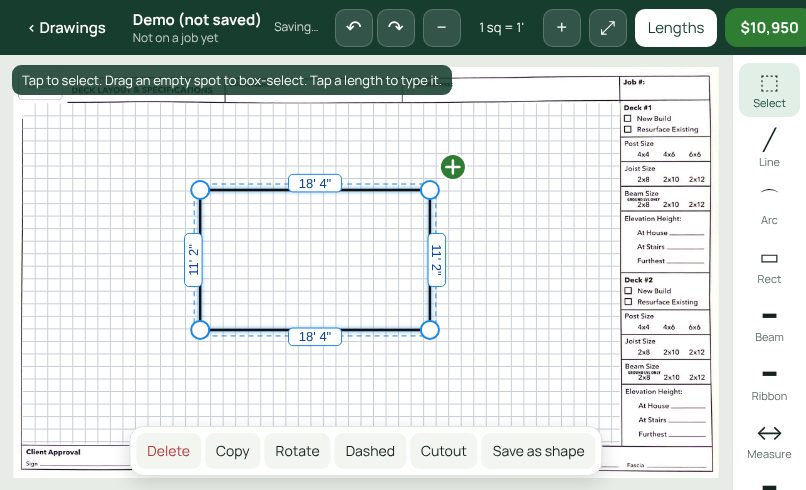
A deck drawn on the drawing sheet with lengths, a ribbon board and stairs
01

Draw it in the customer's yard

Sketch the deck on an iPad while you're standing there. Lines snap square and you can type exact lengths.

  • Decks, stairs, beams, posts, railing and ribbon boards
  • Your logo on a clean drawing sheet the customer can sign
  • Works with a finger or a pencil, even with no signal
Draw · price
The price and how the deck is built, worked out from the drawing
02

Price it before you leave the driveway

The drawing turns into a full material list and a price, from your own costs and your own crew's speed.

  • Boards cut to the right lengths, so you don't over-order
  • Framing, footings, fascia, stairs and screws counted for you
  • Send the quote from your own Gmail with a page the customer opens to pick good, better or best
Pricing setup
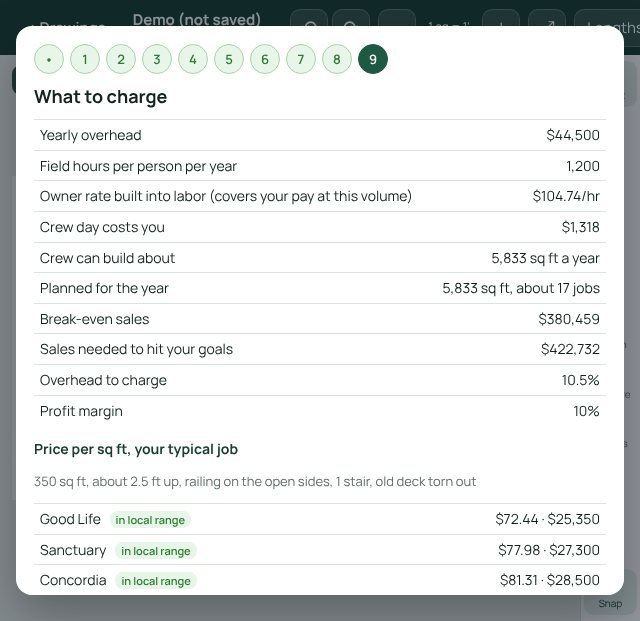
Pricing setup results: overhead, break-even, sales needed and price per square foot
03

Know exactly what to charge

A short guided setup asks about your business, not someone else's. No national averages.

  • Your products, material prices, crew, pay and yearly costs
  • Works out your overhead, break-even and price per square foot
  • Shows the sales and jobs it takes to hit your income goal, and whether your crew can build that much
Hub · Today
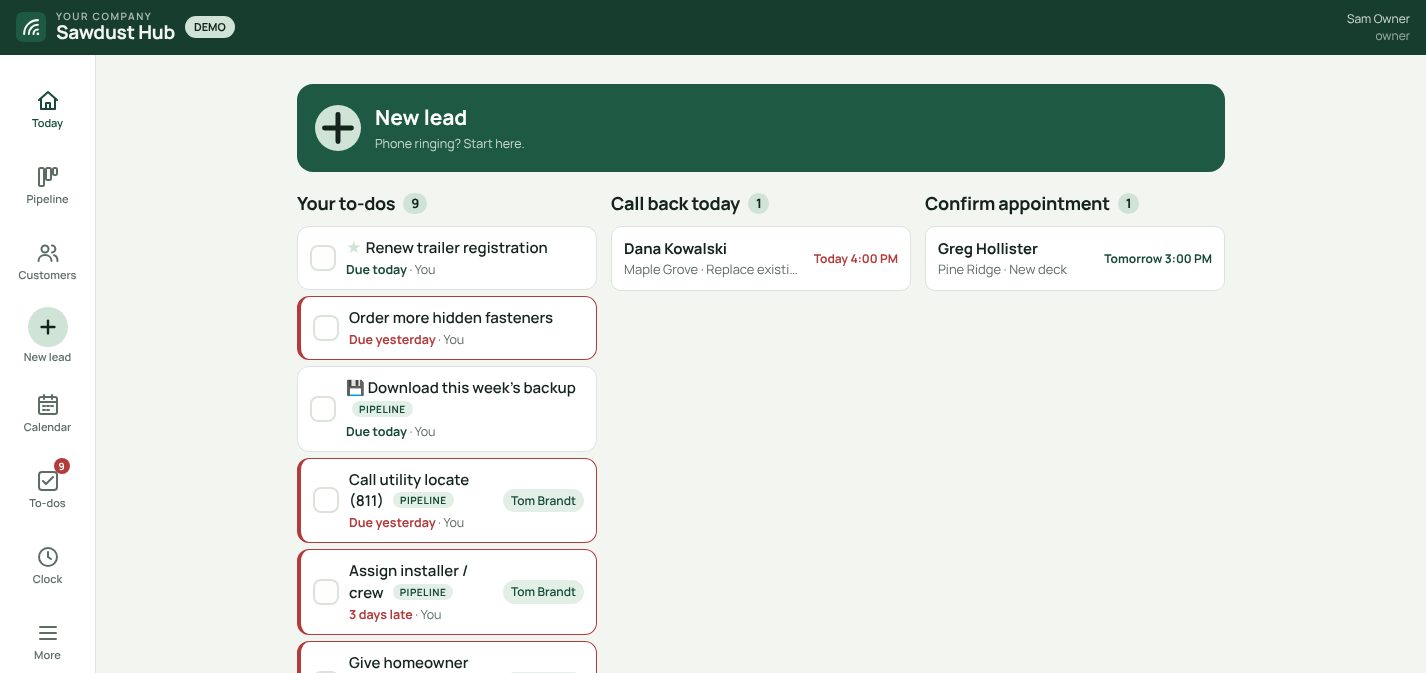
The Today screen: to-dos, callbacks and appointments to confirm
04

Run every job from one place

Leads, appointments, quotes, sold jobs, the schedule and the crew, on your phone, iPad or computer.

  • Today shows your to-dos, callbacks and appointments to confirm
  • When a job reaches a step, the to-do lands on the right person's list
  • The crew clocks in, checks off steps and adds photos from the yard
On autopilot

The busywork runs itself.

Turn on what you want. Everything uses your name, your email and your schedule.

Customer emails

Appointment confirmations, reminders the day before, and a heads-up before the crew shows up.

Website price tool

Homeowners sketch their deck on your website and see a price range from your numbers. The lead lands on your list and you get an email.

Material and dumpster orders

Orders go out to your supplier and dumpster company ahead of the start date, from the material list.

Crew scheduling

Find the next open slot for a sold job. Move one and the jobs behind it shift with it.

Permit and HOA check

Materials can't be ordered until the permit and HOA are cleared, so nothing gets ahead of itself.

Reminders you don't set

Callbacks, quote follow-ups and leads missing info show up on Today on their own, and on your phone's calendar.

Our story

Built on real jobs, not in an office.

I grew up in my family's Michigan exterior remodeling business, going strong for over 53 years. I ran the decking side, selling the jobs and building the decks. Then I started my own deck company and built it from the ground up.

Running it, I learned the ins and outs the hard way: late nights on quotes, ordering mistakes, jobs that slipped through the cracks. Nothing out there was made for how a deck builder actually works, so I built my own system. Now my company runs on it every day.

Sawdust is that system, opened up to other builders. It's made to help you grow, stay organized and see every job from start to finish, without living at the kitchen table.

Jacob WardFounder, Sawdust Software

Try it first

Click around with made-up numbers. No sign-up.

Pricing

One flat price per company. Your whole crew included.

Start with drawings and move up whenever you're ready. Month to month, cancel anytime.

Drawing

$40/month

Replace your drawing app.

  • Draw decks, stairs, railing and posts
  • Lines snap and line up, type exact lengths
  • Your logo on every drawing sheet
  • Save as a picture to send or sign
Start free trial

Quoting

$60/month

Drawing plus a price before you leave the driveway.

  • Everything in Drawing
  • Material list and price from the drawing
  • Your material prices, crew size and crew speed
  • Guided pricing setup that works out what to charge
Start free trial
Everything

Full hub

$200/month

Run the whole company from it.

  • Everything in Quoting
  • Leads, quotes, sold jobs and the schedule in one place
  • Automatic to-dos, reminders and customer emails
  • Crew logins, checklists, photos and job costs
  • Send quotes from your own Gmail
  • Website price tool for your homeowners
Start free trial
30 days free, no card Pay yearly, get 2 months free Free setup over Zoom with every plan In-person setup in Michigan
Getting started

Up and running in an afternoon.

  1. Start your trialYour company name and email. It takes a minute.
  2. Add your logoIt goes on every screen, PDF and drawing sheet.
  3. Set your pricingYour costs, crew and income goal. About 15 minutes.
  4. Bring your crewText them your team link, then quote your next job.

Want a hand? We'll set it up with you over Zoom, free. Call or text Jacob at (810) 701-2848.

Questions

Good questions, straight answers.

Do I need a credit card to try it?

No. You get 30 days free with everything open and no card. If you like it, pick a plan to keep going.

Is there a contract?

No. It's month to month and you can cancel anytime. Pay for a year up front and you get 2 months free plus in-person setup.

How many people can use it?

As many as you have. The price is per company, not per person. Add your office, crew and subs with your team link.

Can my crew see my prices?

No. Crew see the jobs they're building and their own to-dos. Subs only see the jobs you put them on. Prices and costs stay with the office.

Does it work on an iPad or phone?

Yes. It runs in the browser on an iPad, phone or computer, nothing to install. It keeps working with no signal and catches up when you're back in range.

Are the prices yours or mine?

Yours. Material prices, labor, overhead and profit all come from your own costs and goals. Nothing is a national average.

Is my company's data private?

Yes. Your customers, prices, photos and crew are locked to your company. No other builder can see them, and neither can we unless you ask us to help.

Will you help me get set up?

Yes. Every plan comes with free setup over Zoom. In Michigan we can come set it up in person. Help is also one tap away in the app, and we reply within 1 business day.

Your next quote could take minutes, not an evening.

Start your 30-day free trial. No card, no contract.

Start your free trial

Questions? Call or text Jacob at (810) 701-2848